Karaoke Microphone for Tesla Model Y/3/S/X Cybertruck
Karaoke Microphone for Tesla Model Y/3/S/X Cybertruck
Regular price
$79.99 USD
Regular price
$59.99 USD
Sale price
$79.99 USD
Shipping calculated at checkout.
Quantity
Couldn't load pickup availability
Karaoke Microphone for Tesla Model Y/3/S/X, Car Karaoke Microphone with USB-A & USB C Connector Receiver for Tesla Cars, CaraokeMic for Tesla Works for All App
- 【Fits All Tesla Models】 Designed to work seamlessly with every Tesla, including Model Y/3/S/X and Cybertruck. As long as your vehicle runs the latest software (2024.46 or later), this karaoke mic delivers a perfect fit and smooth performance. Great for road trips or long drives—sing with crystal-clear audio and hassle-free connectivity.
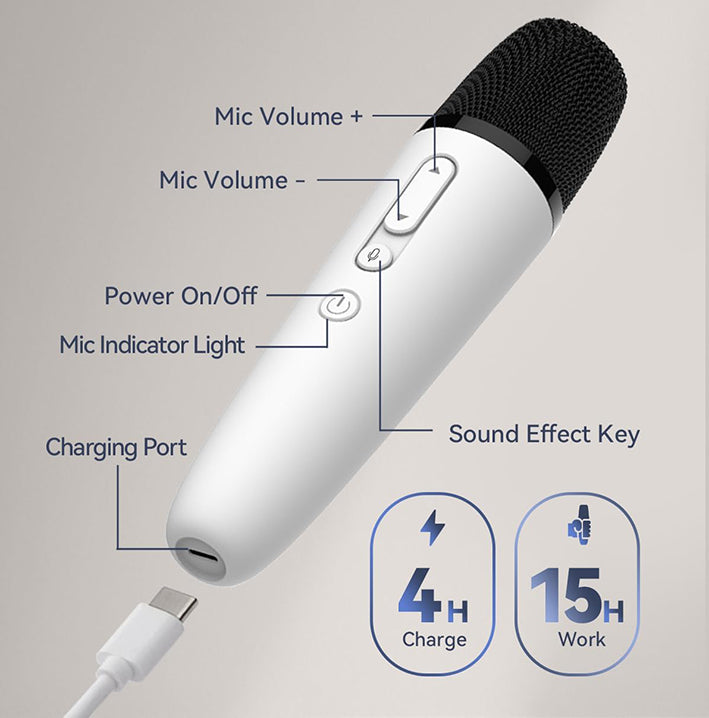
- 【Fast Charge, Long Playtime】 No more dead batteries mid-sing! Fully charges in just 2 hours, offering up to 15 hours of continuous use. Perfect for cross-country trips or daily commutes—karaoke sessions are always on the table. USB-C mic charging makes powering up quick and easy: sing longer, charge faster, and enjoy non-stop fun.
- 【Easy Connection + Dual-Port Receiver (USB-C/USB-A)】 Flexible dual-interface receiver: use the USB-A port in the glovebox (recommended) or USB-C port in the center console (must be a data-enabled port). Simply plug in the receiver, turn on the mic, and start singing—no complicated steps.
- 【Works with All Apps + 4 Fun Sound Effects】 Compatible with All Tesla’s built-in apps (eg.Stingray/Apple Music...) or phone apps (connect your phone to the car via Bluetooth). Adjust volume and sound effects directly on the mic (not the Tesla screen). Choose from 4 modes: Standard: Clean, original vocals; Live: Rich, stage-like depth; KTV: Classic karaoke echo; Concert: Powerful resonance for a superstar feel. Switch modes with one quick button press.
- 【Stable UHF Signal + OTA Updates】 Advanced UHF technology ensures stable connectivity—no lag or dropouts like traditional Bluetooth mics. (Mics are pre-paired at the factory; re-pair if sound is lost.)For sounds delays: Remove USB hubs or turn off Sync lights (if used), or update the mic’s firmware via the MICASSITANT app (available on Google Play). Enjoy constant OTA updates for better performance over time.